
Applies to: OpsLogix Capacity trending reports 1.0.13 and later · SCOM 2019, 2022, 2025
Last updated: October 2026 · Reading time: 5 minutes
The capacity reports are ordinary Reporting Services reports, in the folder /OpsLogix.IMP.Capacity on the SCOM report server. The SCOM console fills in a few parameters for you that you have to supply yourself when you run the reports elsewhere: in the Reporting Services web portal, by URL, or in a linked report.
Easiest: publish from the console
- Open the report in the SCOM console and set the parameters you want.
- Choose File > Publish and give the report a name.
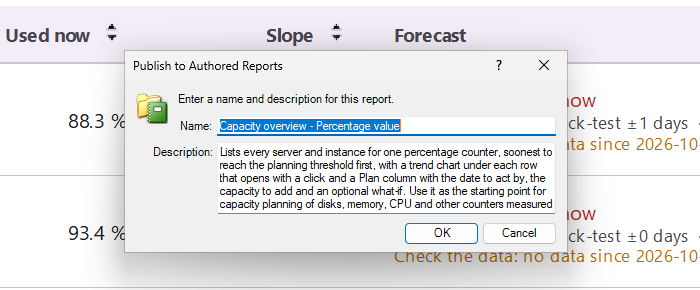
File > Publish in the report viewer saves the report with its current parameters under Authored Reports.
The published report appears under Authored Reports in the console and as a linked report on the report server, with your parameter values saved, including the ones the console normally fills in. You can then run it, link to it or schedule it from the web portal.
Parameters the console fills in
| Parameter | What to pass |
| TimeZone and TimeZoneName | The time zone in the format the SCOM console uses. TimeZone has no default, so a report run without it fails. Copy both values from a report you published from the console: in the web portal, open its Manage > Parameters page. |
| RuleDisplayName (Performance Rule) | The GUID of the collection rule, in lower case. See the query below. |
| ObjectList (heat map, profile and Group Selector reports) | An XML list of groups or objects, by their ManagedEntityRowId in the data warehouse: <Data><Objects><Object Use="Containment">1260</Object></Objects></Data>. Add an Object element per group. |
| Management group parameters | Hidden; the report fills them in itself. |
Find the rule GUID and the ID of a group in the data warehouse database:
-- rule GUIDs for a counter
SELECT LOWER(CAST(r.RuleGuid AS varchar(36))) AS RuleGuid, r.RuleDefaultName, pr.ObjectName, pr.CounterName
FROM vRule r
JOIN vPerformanceRule pr ON pr.RuleRowId = r.RuleRowId
WHERE pr.CounterName = '% Free Space';

-- ManagedEntityRowId of a group
SELECT ManagedEntityRowId, DisplayName
FROM vManagedEntity
WHERE DisplayName = 'My server group';
Run a report by URL
Reporting Services URL access renders a report directly, for example as PDF for a script or an intranet page. In the report server folder, the reports have their internal names, such as OpsLogix.IMP.Capacity.Overview.Percent.Report. Example, on one line, with your own values in angle brackets:
http://<reportserver>/ReportServer?/OpsLogix.IMP.Capacity/OpsLogix.IMP.Capacity.Overview.Percent.Report
  &RuleDisplayName=<rule guid>&CounterName=%25%20Free%20Space&ObjectName=LogicalDisk
  &TimeZone=<TimeZone value>&TimeZoneName=<TimeZoneName value>
  &ExpandCharts=True&rs:Format=PDF
Encode special characters in the URL: % becomes %25 and a space %20. Parameters you leave out use their defaults, such as 90 days back and ahead and a threshold of 80 %.