
Applies to: OpsLogix VMware Management Pack 26.10.4540.0 and later · SCOM 2019, 2022, 2025 · vCenter 7.0, 8.0, 9.0
Last updated: October 2026 · Reading time: 4 minutes
The VMware Management Pack stores the vCenter custom attributes of each virtual machine in SCOM. Some backup products, such as Veritas NetBackup, write a new value to a custom attribute after every backup. SCOM then sees a configuration change for every VM after each backup, which adds load to the SCOM databases. This article explains how to leave those attributes out.
Where custom attributes are stored
The VMware Virtual Machine discovery reads the custom attributes of each VM in vCenter and stores them in the CustomFields property of the VMware Virtual Machine object. The attributes are listed by name, in alphabetical order, as [name, value] pairs.
The discovery runs every 22,500 seconds (about 6.25 hours). When any value in CustomFields changes between two runs, SCOM records a configuration change for that VM.
Which attributes cause the problem
Attributes that change on a schedule cause a configuration change every cycle. A common example is NetBackup, which updates NB_LAST_BACKUP after each backup. Other backup or automation products can do the same. In vCenter, check which custom attributes change often on your VMs.
Override parameters
Two overrides on the VMware Virtual Machine discovery choose which attributes are stored. Both are regular expressions matched against the attribute name. The match is case sensitive. An attribute is stored when its name matches CustomFieldsInclude and does not match CustomFieldsExclude.
| Parameter | Default | Meaning |
| CustomFieldsInclude | (.*) | Only attributes whose name matches are stored. |
| CustomFieldsExclude | ^()$ | Attributes whose name matches are not stored. |
With the defaults, all attributes are stored, as in earlier versions.
| Goal | Override |
| Leave out all NetBackup attributes | CustomFieldsExclude ^NB_ |
| Leave out only the last backup time | CustomFieldsExclude ^NB_LAST_BACKUP$ |
| Store only attributes that start with "CMDB_" | CustomFieldsInclude ^CMDB_ |
| Store no custom attributes at all | CustomFieldsExclude (.*) |
How to set the override
- In the Operations console, go to Authoring > Management Pack Objects > Object Discoveries.
- Search for VMware Virtual Machine discovery.
- Right-click it and select Overrides > Override the Object Discovery > For all objects of class: VMware Datacenter. Select For a group to change it for some datacenters only.
- Select Override next to CustomFieldsExclude and enter the regular expression, for example
^NB_. - Select an unsealed management pack to store the override, or create a new one.
- Click OK.
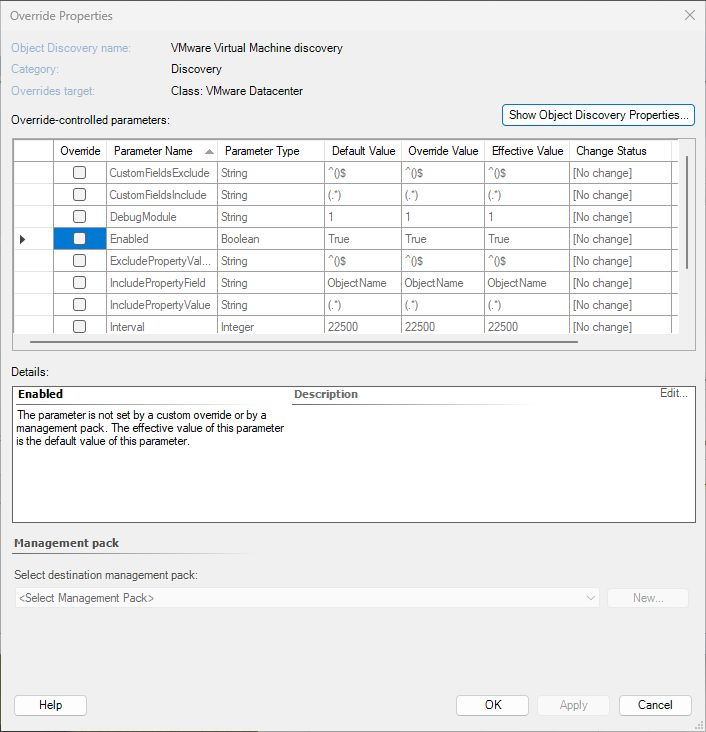
The change applies at the next discovery cycle. In that cycle, each VM that had a matching attribute gets one last configuration change, because the attribute is removed from CustomFields. After that, a change to an excluded attribute no longer causes a configuration change.
If the regular expression is not valid, the discovery keeps storing all attributes.
Good to know
- The CustomFields property holds at most 256 characters. VMs with many attributes can be cut off. Leaving out attributes you don't need also helps here.
- The filter only changes what is stored in SCOM. The attributes stay in vCenter.
- If you only lowered the discovery interval as a workaround, you can set it back to the default after you add the exclude override.