■ Management Packs for Operations Manager and Azure Solutions
■ Automation and integration products for Operations Manager
■ Plan, measure and follow up on KPIs of your IT Service delivery
■ Managed SCOM Service
■ World-class consultancy services

Complete VMware vSphere & vSAN monitoring, natively in Microsoft SCOM
Monitor vCenter, ESXi hosts, clusters, virtual machines, datastores, hardware, networks and vSAN from the SCOM console your team already runs, with security monitoring, vSAN Skyline Health, capacity analysis and dashboards built in.
Latest version: VMware Management Pack V.26.10.4540.0 | Released October 2026 | Multiple releases per year - Release notes
Supports VMware vSphere 7, 8 and 9 · Microsoft SCOM 2016, 1801, 1807, 2019, 2022 and 2025
The Opslogix VMware Management Pack brings your entire VMware environment into Microsoft System Center Operations Manager (SCOM), alongside everything else your team already monitors. One console, one skill set, nothing new to deploy.
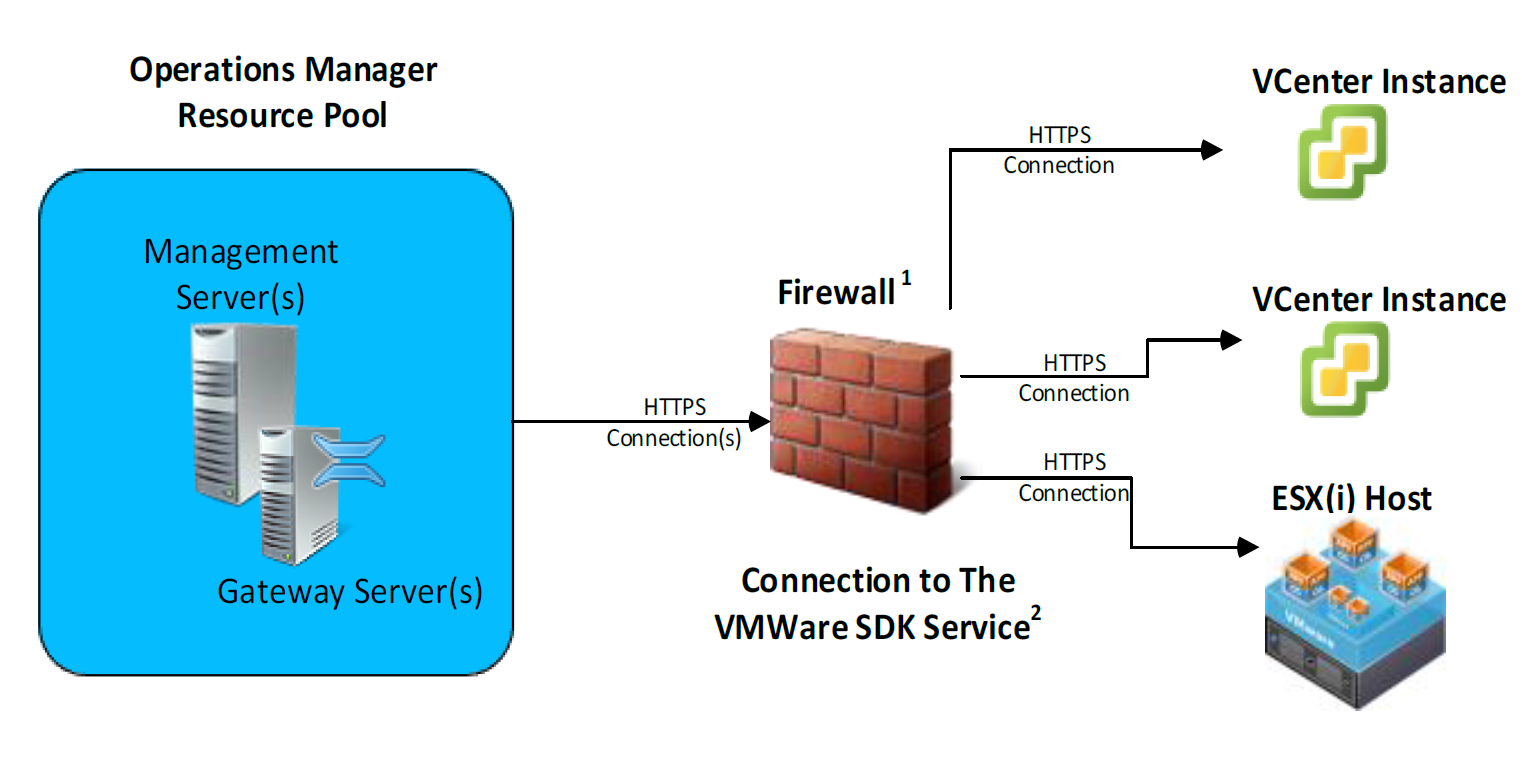
Runs as native SCOM Management Packs.
No separate monitoring server, proxy platform, database or connector.
347 monitors and rules covering vCenter, ESXi, VMs, datastores, hardware, networking, capacity, vSAN and security.
Version-specific VMware Security Packs identify VMware security-hardening deviations and surface them directly as SCOM health states and alerts.
Monitor Skyline Health, disks, disk groups, capacity, IOPS, throughput, latency, congestion, resync traffic and hardware compatibility.
Use native SCOM Resource Pools for monitoring high availability.
Connect through VMware APIs using read-only permissions.
Full-stack VMware monitoring in SCOM, from vCenter down to the disks inside each guest. Every object below is discovered automatically and kept up to date, no manual inventory to maintain.
How the Opslogix VMware Management Pack connects SCOM to VMware, and what you get out of the box.
See security-hardening drift the moment it appears. The VMware Security Packs check ESXi hosts, virtual machines and distributed switches against VMware security-hardening recommendations, every deviation becomes a SCOM health state and alert, in the same console as availability and performance.
Run vSAN with the same confidence as the rest of your estate. vSAN health, capacity and performance live directly in the SCOM health model, through dedicated vSAN and vSAN Dashboards Management Packs.
One health model from vCenter down to each VM. Dependency monitors roll availability and health upward, so operators see a problem’s impact at every infrastructure level, in native SCOM topology, not a bolted-on view.
The VMware Management Pack runs inside your existing Microsoft SCOM environment. There is nothing else to deploy, patch or license alongside it.
207 monitors and 140 rules provide out-of-the-box monitoring across the VMware stack, delivered as native SCOM Management Packs.
See exactly what we monitor. No vague feature claims: explore the monitors, rules, discoveries, performance metrics and default monitoring behavior included with the Opslogix VMware Management Pack.
Spot overcommitted clusters before they become performance problems. The Capacity Analysis Management Pack monitors and trends CPU, memory and datastore overcommitment per cluster, with dedicated dashboards for the results.
Calculated three ways:
Dedicated capacity analysis dashboards show CPU, memory and datastore overcommitment results per cluster.
See exactly what we monitor. Detailed answers on discovery, ESXi, hardware, VM, guest, datastore, vSAN, alarm, capacity and security monitoring.
VIEW COMPLETE MONITORING REFERENCE347 monitors and rules (207 monitors and 140 rules) across your whole vSphere environment, delivered as native SCOM Management Packs:
These are all discovered automatically and kept up to date in SCOM:
Yes. The Hardware Management Pack has 22 monitors that check each hardware component and roll its health up to the host:
Yes. The Guest Monitoring Management Pack uses VMware Tools, so no SCOM agent is needed inside the VM:
Yes, with a dedicated vSAN Management Pack and vSAN Dashboards Management Pack. vSAN monitoring alone includes 72 monitors and 40 rules:
Yes. New vCenter alarms are picked up and raised as SCOM alerts, so you see VMware’s own alarms next to your other SCOM alerts. You can customize which alarms are forwarded.
Yes. The Capacity Analysis Management Pack monitors and trends CPU, memory and datastore overcommitment per cluster. Each is calculated three ways: all VMs, powered-on VMs only, and powered-off VMs only. Dedicated Capacity Analysis dashboards show the results.
The VMware Security Packs perform security-hardening and configuration checks on ESXi hosts, VMs and distributed switches, based on VMware security-hardening recommendations. Every deviation becomes a SCOM health state and alert. That’s 38 checks for vSphere 9, with version-specific packs for vSphere 6.5, 6.7, 7.0, 8.0 and 9.0.
Objects are modeled as a native SCOM health model: vCenter → Datacenter → Cluster → ESXi host → Virtual Machine, with datastores and networks related to them. Dependency monitors roll up host, cluster, datastore and VM availability to the datacenter, so you can see a problem’s impact at every level.
The core packs plus the vSphere 9 security pack contain 207 monitors and 140 rules (347 in total). Every monitor and rule is documented in our knowledge base .
Fourteen criteria worth checking in any VMware monitoring solution for Microsoft SCOM, and how the Opslogix VMware Management Pack answers each one.
| Evaluation criterion | How Opslogix addresses it |
|---|---|
| ✓ Native SCOM integration | Delivered as native SCOM Management Packs; runs on SCOM Management Servers or Gateways |
| ✓ Current vSphere support | vSphere 7, 8 and 9; SCOM 2016 through 2025 |
| ✓ vSAN depth | 112 vSAN monitors and rules, 55+ Skyline Health checks, vSAN dashboards |
| ✓ Security monitoring | VMware Security Packs: 38 security-hardening checks for vSphere 9, version-specific packs back to vSphere 6.5 |
| ✓ Monitor/rule transparency | 347 monitors and rules, each documented in the knowledge base |
| ✓ Hardware monitoring | 22 ESXi hardware monitors with rollup to the host |
| ✓ Capacity analysis | CPU, memory and datastore overcommitment per cluster, with dashboards |
| ✓ SCOM health rollup | vCenter → Datacenter → Cluster → ESXi host → VM, with dependency monitors |
| ✓ VMware alarm integration | New vCenter alarms raised as SCOM alerts; you choose which are forwarded |
| ✓ HA architecture | SCOM Resource Pools |
| ✓ Read-only permissions | Read-only vCenter or ESXi account |
| ✓ No separate monitoring platform | No appliance, connector or separate monitoring database |
| ✓ Release frequency | Multiple releases per year; see the release notes |
| ✓ Licensing / TCO | Per physical monitored CPU socket; no additional monitoring platform to license |
Cost-effective socket-based VMware monitoring without licensing an additional monitoring platform. Licensed per physical monitored VMware CPU socket, with the first year of support and assurance (SA) added at purchase.
Over ten years of software development creating add-ons for Microsoft System Center Operations Manager. Opslogix combines software with professional services for organizations working with the System Center suite.
Supports vSphere 9 and SCOM 2025. Multiple product releases per year, with continuous improvement and personal support.
Current VMware vSphere and Microsoft SCOM support. See the full support matrix and sizing guidance.
| Component | Supported version or requirement |
|---|---|
| VMware vSphere | 7.x, 8.x and 9.x (latest supported: 9.1) |
| VMware ESXi | 7.x, 8.x and 9.x |
| VMware vCenter Server | 7.x, 8.x and 9.x |
| VMware vCenter Server Appliance (vCSA) | vSphere 7.0 and later |
| Microsoft SCOM | 2016, 1801, 1807, 2019, 2022 and 2025 |
| Permissions | Read-only access to vCenter or ESXi |
| System requirement | SCOM Management Server or Gateway Server with .NET Framework 4.7 or later |
Compatibility, licensing, sizing and product updates for the VMware Management Pack for SCOM.
VMWARE MANAGEMENT PACK DOCUMENTATIONThe Opslogix VMware Management Pack supports Microsoft System Center Operations Manager 2016, 1801, 1807, 2019, 2022 and 2025.
VMware vCenter and ESXi 7.0 and later are supported, including vSphere 8 and vSphere 9 (latest supported version: 9.1). The VMware vCenter Server Appliance (vCSA) is supported for vSphere 7.0 and later. See the support matrix.
Yes. The Capacity Analysis Management Pack monitors and trends CPU, memory and datastore overcommitment per cluster. Each is calculated three ways: all VMs, powered-on VMs only and powered-off VMs only. Dedicated Capacity Analysis dashboards show the results.
Capacity scales with your SCOM Management Servers. Opslogix sizing guidance for a default configuration on a dedicated Management Server or Gateway:
Every environment is different; see the sizing guide for details.
The VMware Management Pack is under continuous development, with multiple releases per year adding features and support for the latest VMware vCenter and ESXi versions. See the release notes for the full release history.
The Opslogix VMware Management Pack is licensed per physical monitored VMware CPU socket. The first year of support and assurance (SA) is mandatory and is added to each socket upon purchase. Each subsequent year, you are only charged for software and assurance. See VMware Management Pack licensing.
Only an account with read-only permissions in your vCenter or ESXi environment.
A System Center Operations Manager Management Server or Gateway Server with .NET Framework 4.7 or later.
Everything you need to deploy the VMware Management Pack in your SCOM environment:
Installation Guide · Configuration Guide · User Guide · Release Notes
IJburglaan 630H
1087 CE Amsterdam
The Netherlands
Call us: +31 20 893 2048
VAT NL820308195B01
Office hours are
CET (Central European Time)